Lovatine: The Delicate Script That Elevates Your Design Without the Hype
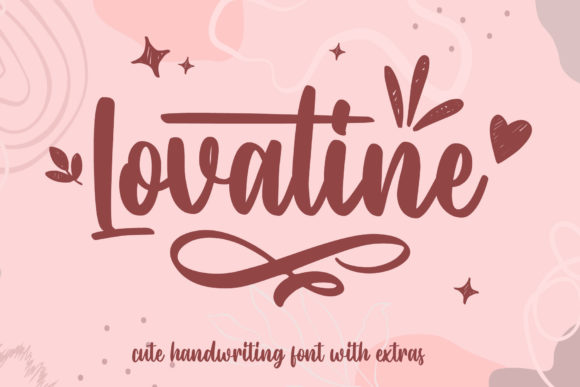
If you are looking for a typeface that whispers rather than shouts, Lovatine is likely the missing piece in your design puzzle. It is not just another script font; it is a carefully crafted character that brings a sense of freshness and class to any project. Whether you are a small business owner designing a wedding invitation or a marketer creating a luxury brand identity, the delicate strokes of Lovatine can transform a mundane layout into something memorable. However, simply downloading a beautiful font is only half the battle. To truly leverage its potential, you must understand how to integrate it correctly.
Many designers rush to apply script fonts without considering the nuances of their specific features. With Lovatine, the goal is to achieve a lovely and refreshing look, but this often requires a shift in mindset regarding typography selection. You need to move beyond the visual appeal and consider the technical underpinnings that make this font so versatile. By understanding these details, you can avoid common pitfalls that ruin even the most elegant designs.
Understanding the Unique Value of PUA Encoding
One of the most significant advantages of Lovatine is its encoding method. Unlike standard fonts that rely on basic keyboard inputs, Lovatine is PUA encoded. This stands for Private Use Area, a section of the Unicode standard reserved for custom characters. While this might sound like technical jargon, it is actually a powerful tool for creators who want access to a wide array of glyphs and ligatures without needing complex software plugins.
The mistake many beginners make is assuming they can type out every variation using their physical keyboard. If you try to force standard letters into a PUA-encoded font, you will miss out on the unique swashes, alternate capitals, and decorative flourishes that define the font's personality. These special characters are mapped to keys that do not exist on a standard QWERTY layout. Consequently, if you do not learn how to access them, your design will look incomplete and generic.
- The Trap: Relying solely on standard typing methods limits your creative output.
- The Reality: PUA encoding allows for a vast library of stylistic alternatives that create a cohesive, hand-lettered feel.
- The Solution: Invest time in learning the specific mapping or use the provided font panel tools to insert these glyphs manually.
When you take the time to explore these hidden characters, the difference is immediate. A simple greeting card becomes a work of art when you replace a standard "L" with its ornate PUA counterpart. This level of detail is what separates professional-grade work from amateur attempts. It ensures that every element of your design contributes to the overall narrative of elegance.
Common Pitfalls in Typography Selection and Application
Even with a fantastic font like Lovatine, poor execution can lead to frustration. One of the most frequent errors involves overuse. Because Lovatine is so striking and delicate, there is a temptation to use it for everything. However, scripts are best used as accents rather than body text. Using Lovatine for long paragraphs can reduce readability and fatigue the reader's eyes, defeating the purpose of having a clear communication channel.
Another critical oversight is ignoring the context of the audience. While Lovatine exudes class, it may not be suitable for every industry. For instance, using this delicate script for a heavy industrial construction company might send mixed signals about reliability and strength. Conversely, using it for a high-end spa or a boutique fashion brand aligns perfectly with the desired brand image. Always evaluate whether the "refreshing look" matches the core message you are trying to convey.
Furthermore, spacing issues are a silent killer of good design. Scripts naturally have varying widths between letters. When applying Lovatine, you must pay close attention to kerning (the space between two specific letters) and tracking (the overall spacing of a word). Tight tracking can cause the delicate loops of the script to collide, making the text look messy and illegible. On the other hand, too much space can break the flow of the letterforms, making them appear disjointed.
Tip: Always preview your text at the actual size it will appear in the final medium. What looks balanced on a large monitor might become cramped on a mobile screen or a printed flyer.
Evaluating Compatibility and Usability Before You Buy
Before purchasing or downloading Lovatine, it is wise to check its compatibility with your existing workflow. Since it relies on PUA encoding, you need to ensure that the software you are using supports these custom mappings effectively. While modern design applications like Adobe Illustrator, Photoshop, and InDesign handle PUA fonts well, older versions of software or certain web browsers might struggle to render the full range of glyphs correctly.
This is particularly important for web designers. If you plan to embed Lovatine on a website, you must verify that the font files are properly formatted and optimized. Poorly optimized font files can slow down page load times, which negatively impacts user experience and SEO rankings. Additionally, ensure that the font license allows for the intended use, whether it is for personal projects, client work, or commercial distribution. Misunderstanding licensing terms can lead to legal issues and financial penalties down the road.
To avoid these headaches, test the font in your specific environment before committing to a full project. Create a sample document that includes the most complex ligatures and glyphs you intend to use. Check how they render across different devices and platforms. This proactive approach saves time and ensures that your final product maintains the high quality that Lovatine promises.
Maximizing the Potential of Your Design Choices
Once you have navigated the technical and practical challenges, the true power of Lovatine shines through. It offers a way to inject personality into designs that often feel sterile and corporate. By combining it with clean sans-serif fonts, you can create a beautiful contrast that guides the viewer's eye and emphasizes key information. This pairing strategy is excellent for headlines, logos, and call-to-action buttons.
Remember that the goal of using Lovatine is to enhance communication, not obscure it. When used thoughtfully, it acts as a visual cue that signals care, attention to detail, and sophistication. Whether you are a freelancer pitching a new client or an educator creating engaging course materials, the right typographic choice can make all the difference. By avoiding the common mistakes discussed here and embracing the unique features of this PUA-encoded font, you can produce work that stands out in a crowded digital landscape.
In conclusion, Lovatine is more than just a pretty font; it is a strategic asset for anyone seeking to elevate their visual storytelling. Take the time to master its encoding, respect its limitations, and apply it with intention. When you do, the results will speak for themselves, offering a lovely and refreshing look that resonates with your audience.