Windy: A Timeless Script Font for Elegant Design Projects
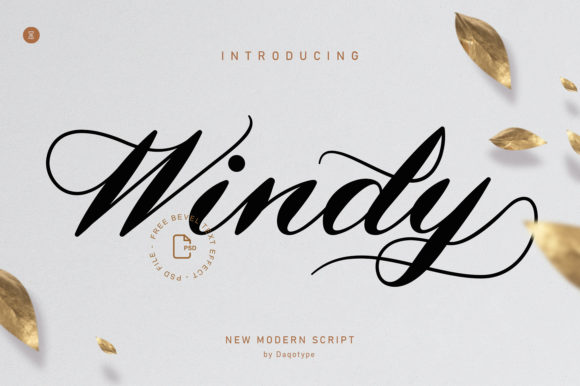
Windy is a classic script font that brings an air of sophistication and luxury to any design project. Its elegant curves and flowing lines make it a favorite among designers, artists, and creative professionals who want to add a touch of class to their work. Whether you're creating wedding invitations, branding materials, or editorial designs, Windy offers a versatile and stylish solution that can elevate your visual communication.
Why Choose Windy for Your Design Needs?
The appeal of Windy lies in its ability to convey a sense of refinement and artistry. It's particularly well-suited for projects where a personal, handwritten feel is desired but with the polish of professional typography. From greeting cards to book covers, Windy provides a unique aesthetic that stands out in a sea of generic fonts.
One of the key features of Windy is its PUA (Private Use Area) encoding. This means that users have easy access to all the special glyphs and swashes included in the font. These additional characters allow for more creative expression, making it easier to create visually striking text without the need for complex workarounds.
Common Mistakes When Using Windy
While Windy is a powerful tool, there are several common mistakes that can undermine its effectiveness. One frequent error is using it in inappropriate contexts. For example, applying Windy to body text in long-form content like articles or reports can be distracting and reduce readability. It’s best reserved for headings, logos, and short bursts of text where its elegance can shine.
Another mistake is overlooking the importance of pairing Windy with complementary fonts. Using it as the only font on a page can lead to a cluttered or unbalanced design. Consider combining it with a clean sans-serif or serif font for body text to maintain harmony and clarity.
Ignoring Kerning and Spacing
Many users fail to adjust the spacing between letters when using Windy. Because of its flowing style, proper kerning is essential to ensure the text looks polished and professional. Neglecting this detail can result in awkward spacing that detracts from the overall quality of the design.
Solution: Always preview your text in different sizes and layouts. Use font tools or software that offer automatic kerning adjustments, or manually tweak the spacing for optimal results.
Overusing Swashes and Decorative Elements
Windy comes with a range of swash characters and decorative elements, which can be tempting to use excessively. However, overuse can make the text appear cluttered and hard to read. It's important to strike a balance between visual interest and legibility.
Example: Instead of using swashes for every letter in a heading, consider using them sparingly—perhaps just on the first and last letters—to add a touch of flair without overwhelming the reader.
What to Check Before Using Windy
Before incorporating Windy into your design, there are a few things to consider. First, ensure that the font is compatible with your design software. While most modern programs support PUA-encoded fonts, it's always a good idea to verify this before downloading.
Second, check the licensing terms. If you're using Windy for commercial purposes, make sure you have the appropriate license that allows for such use. Some fonts require a purchase for commercial applications, while others may be free for personal use only.
Lastly, test the font in different environments. How does it look on screen versus print? Does it scale well at various sizes? Taking the time to evaluate these factors will help ensure that Windy performs as expected across all mediums.
Practical Tips for Better Results with Windy
To get the most out of Windy, start by experimenting with different styles and weights. Many script fonts include variations that can be used to create contrast and depth in your designs. Explore these options to find the perfect match for your project.
Additionally, don’t forget to consider the color palette when using Windy. Light colors or pastels can enhance the elegance of the font, while bold colors can make it stand out even more. Play around with different combinations to see what works best for your design goals.
Finally, keep your design clean and focused. Windy is a statement font, so it should be used strategically. Let it be the centerpiece of your design rather than competing with other elements.
By avoiding common pitfalls and following these practical tips, you can unlock the full potential of Windy and create stunning, professional designs that reflect both creativity and attention to detail.